

Supabase Security: Why RLS Is Only 25% of the Problem

Historically, a common way to scan Supabase applications was to find the publishable key in the client-side JavaScript code, retrieve the OpenAPI schema to enumerate the tables, and test what the anon role can read or write. This was a useful way to quickly map part of the attack surface of a Supabase application, but it no longer works. Supabase recently removed anonymous access to the OpenAPI schema, so the publishable key can no longer be used to enumerate tables.
Even with the schema available, we found that row-level security (RLS) being disabled on a table accounted for only about 25% of the Supabase vulnerabilities we found. The other 75% either had a twist on this basic vulnerability or had nothing to do with RLS. Through them, an attacker could pull user PII in the hundreds of thousands of rows, thousands of private AI conversations and the documents uploaded to them, entire sales pipelines with every prospect and deal, call voice recordings, payment details, customer support chats, and more.
Internal Applications With Open Registration
Many companies are building internal applications with AI. We've seen everything from CRMs and sales tools to employee training and user onboarding applications. These applications often handle sensitive business data and are intended to be used only by employees.
Getting an authenticated session is one of the first things an attacker tries on a new target, because the authenticated attack surface is almost always far wider than the anonymous one, so we made our automated scanner do the same thing. It attempts to sign up to every target whenever possible and repeats every test as a logged-in user. It was one of the highest-yield changes we made.
In many of the applications we tested, anyone could create an account despite there being no intended way for an outsider to register. Once we had an account, authentication was often the only meaningful security boundary, and we could do pretty much anything.
In CRMs and sales tools, we could read and modify customer and prospect lists, deal stages and values, sales meeting notes and AI-generated summaries, and outbound marketing campaigns.
In employee training applications, we could access employee PII, training question banks and their answers, and all employees' progress toward training goals.
In internal task-tracking applications, we could read customer requests and their attachments, as well as customer support interactions.
How registration was exposed
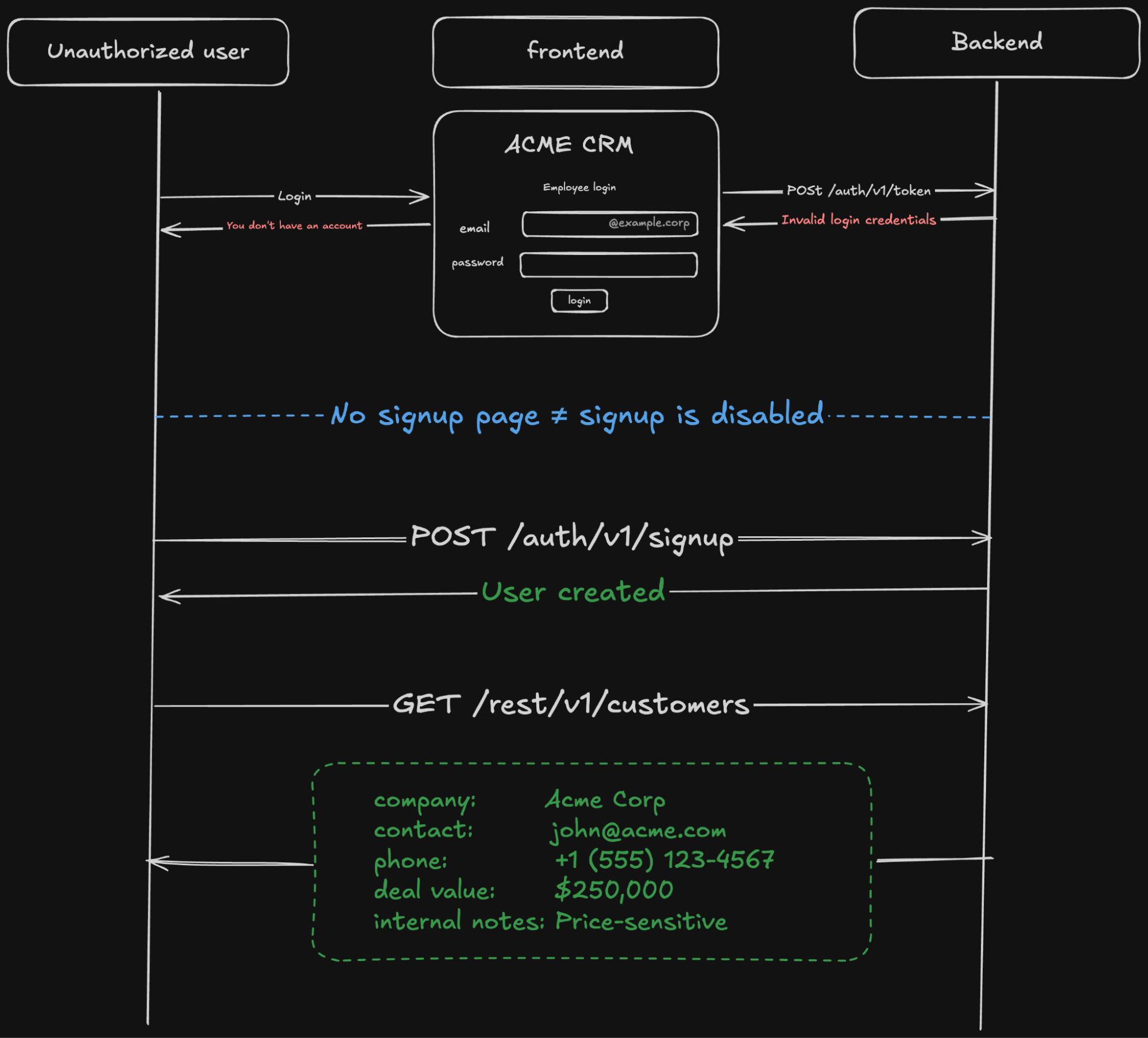
Registration enabled with no signup page
The application had no way to register through its UI, but Supabase Auth still allowed public registration. An attacker could simply call /auth/v1/signup directly.
Email domain restricted in the frontend
Some applications checked that the email ended in @example.com before allowing signup, but only on the frontend and, again, an attacker could simply call /auth/v1/signup directly.
Email domain restricted with a Before User Created Hook
Some applications use a Before User Created hook to restrict registration to specific email domains. The hook runs on the backend and can inspect the user object before allowing the account to be created, so unlike a frontend-only restriction, it cannot be bypassed by calling /auth/v1/signup directly. However, there are several ways this restriction could still be bypassed:
- If Confirm Email is disabled, an attacker can register with an employee's email address without having access to the mailbox.
- If the allowed domains list is stored in a database table with a permissive policy, an attacker may be able to add their own domain to the list. Only the
supabase_auth_adminrole, which is used by the Supabase Auth middleware, should be granted access to that table. - If the hook allows by default when it cannot recognize an email domain, an attacker just needs to register with an unrecognized domain. The Supabase documentation example fails open, because it shows the implementation of both an allowlist and a blocklist in the same snippet, so make sure to modify it before using it.
-- Check for allow match
select count(*) into is_allowed
from public.signup_email_domains
where type = 'allow' and lower(domain) = lower($1);
if is_allowed > 0 then
  return '{}'::jsonb;
end if;

-- Check for deny match
select count(*) into is_denied
from public.signup_email_domains
where type = 'deny' and lower(domain) = lower($1);
if is_denied > 0 then
  return jsonb_build_object(
    'error', jsonb_build_object(
      'message', 'Signups from this email domain are not allowed.',
      'http_code', 403
    )
  );
end if;
-- No match, allow by default
return '{}'::jsonb;
Database Tables Exposed Over the REST API
A typical request to Supabase's PostgREST API server looks like this:
GET /rest/v1/messages?select=sender_id,receiver_id,content&receiver_id=eq.<alice's user id>
apikey: <publishable key>
Authorization: Bearer <alice's access token>
Accept-Profile: chat
The following values are extracted from the request:
- The user identity is determined from the
sub(subject) claim of the JWT access token. - The role is the
roleclaim of the access token. If there's no token and only the publishable key is used, the request runs asanon. If a secret key is used, it runs asservice_role. - The operation is the HTTP method:
GETisSELECT,POSTisINSERT,PATCHisUPDATE,DELETEisDELETE. - The schema comes from the
Accept-Profileheader for reads andContent-Profilefor writes, defaulting topublicwhen absent. - The table is in the path.
- The columns are the
selectparameter, defaulting to*(all columns) when absent. - The filter is the
receiver_id=eq...parameter, which becomes aWHEREclause, defaulting to no filter (return all rows the user is allowed to access) when absent.
So the request translates into: the user alice, holding the role authenticated, wants to SELECT the columns sender_id, receiver_id and content, from the table messages in the chat schema, where receiver_id is her own ID.
Those values are evaluated by three layers. Each one may reject the request or allow it to proceed to the next layer.
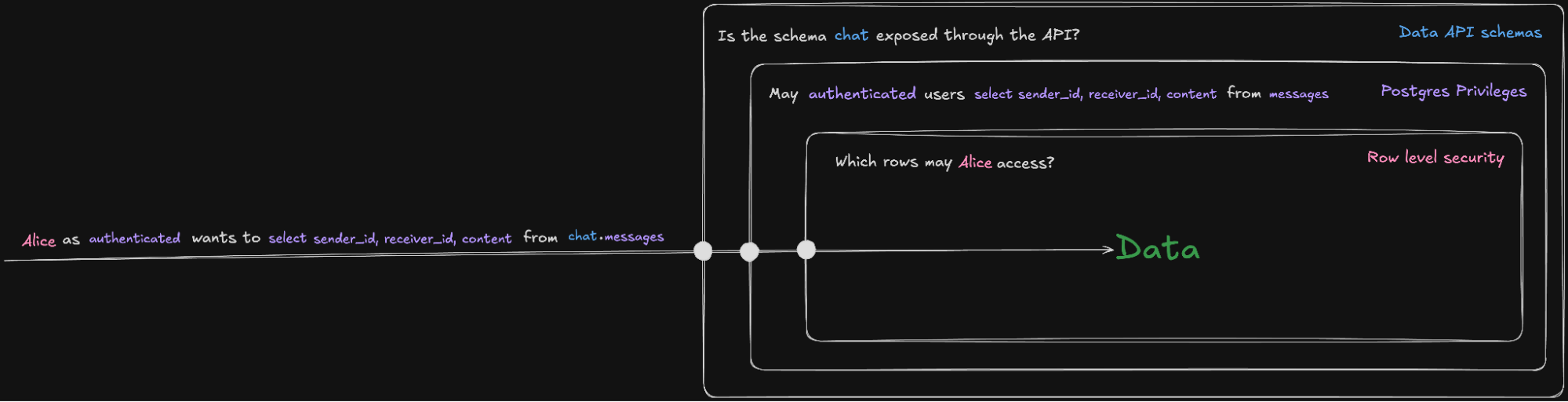
API schemas
PostgREST serves only the schemas listed under "Exposed schemas" in the project's API settings. public is the only schema on the list by default. Users can modify the exposed schema list to add more (custom ones or built-in ones like storage), at which point they are served exactly like public.
Postgres access controls
Postgres evaluates the role, the operation, the schema, the table and the columns, and decides if the query is allowed based on grants. A grant is a statement about a role as a whole, so this check cannot distinguish one caller holding that role from another.
What a role can do is the union of privileges granted to it directly, privileges inherited from groups it belongs to, and privileges granted to public role, a pseudo-role every other role is implicitly a member of (not to be confused with the public schema).
Operations can be granted independently, so SELECT may be revoked on a table while INSERT is granted on it.
Column-level privileges are also supported, so a table as a whole may be inaccessible to a role, while some of its individual columns are accessible.
Row-level security (RLS)
When RLS is enabled on a table, every query against the table is filtered by the table's policies. A policy is a boolean SQL expression that Postgres adds to the query as a WHERE clause, so a row is accessed only if the expression is true for that row. Policies are declared per operation, and a table can have several for the same operation. When a table has more than one policy, they can either be permissive (combined with OR, any matching policy allows access) or restrictive (combined with AND, all policies have to match).
This is the only one of the three layers that can see the identity of the individual caller. Helper functions like auth.uid() can return the caller identity to the policy, so it can for example compare a row's user_id to the caller's user ID and allow access only if they match. Whether it actually does is up to whoever wrote the policy. to authenticated using (true) is a valid policy that ignores the caller context.
If RLS is disabled on a table, or a secret/service_role key is used to make the request, this layer is skipped.
How tables were exposed
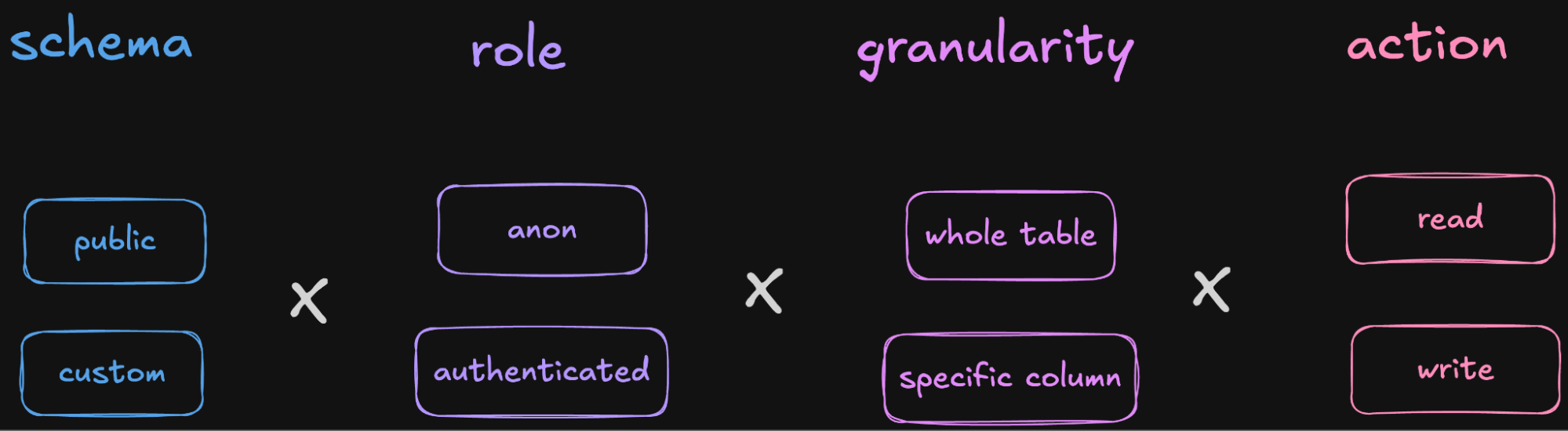
For every table we tested, we varied four factors:
- Schema: enumerate tables in every exposed schema, not just
public - Role: test with an authenticated account, not just
anon - Granularity: if access to the whole table is revoked, request individual columns
- Action: try both a read and an insert
The typical check — read a table in the public schema with the publishable key — accounted for 33% of the table vulnerabilities we found. The rest came from changing one of the other variables. Part of why the usual case is rarer than it used to be is that Supabase has been changing defaults. Tables created through the dashboard start with RLS enabled, and new tables in public are no longer granted to the Data API roles until someone grants them.
Authenticated is not authorized
Of the tables we tested, 125 were not accessible to the publishable key and became accessible once we created an account. This pattern was common on apps that were meant to be internal, but we also found it in public, user-facing apps, where one authenticated user could read or modify data that belongs to another user or another tenant.
When RLS is disabled on a table, Supabase generally makes it hard to miss.
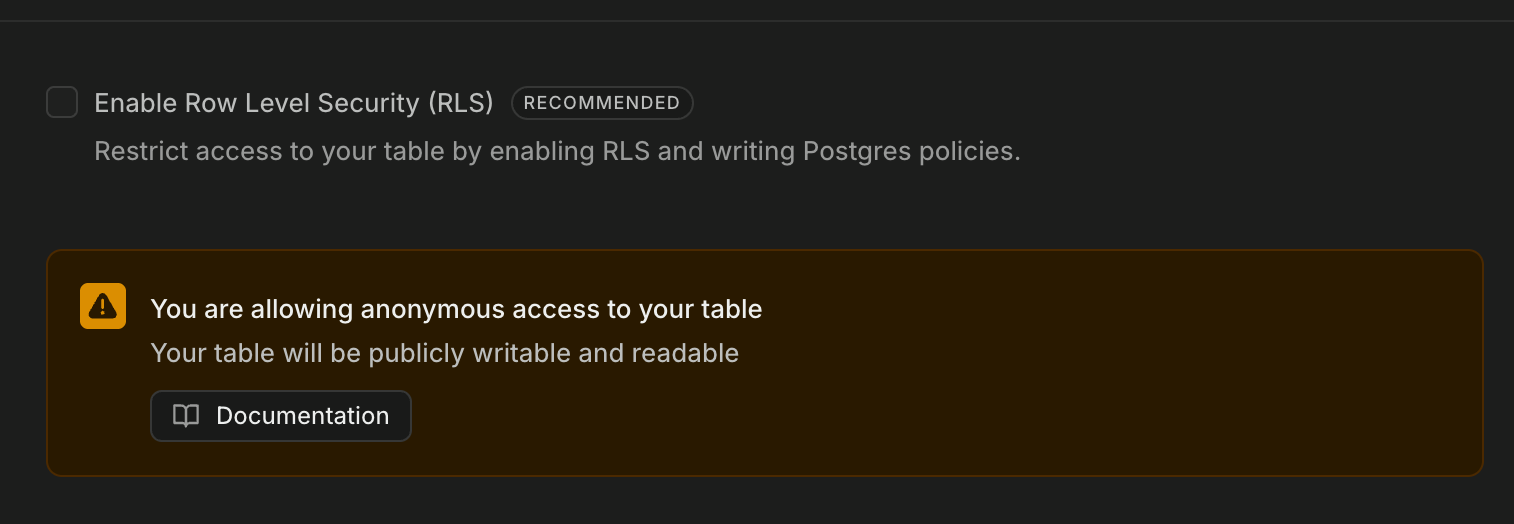
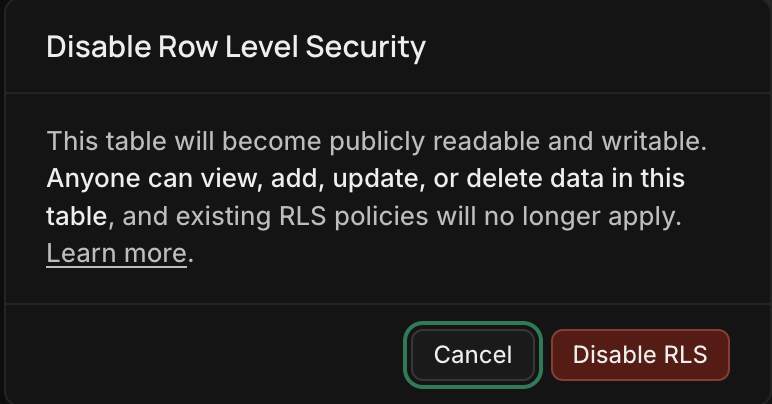

Enabling RLS and adding a permissive policy that doesn’t do anything is the easiest way to make the alerts go away without breaking the functionality of the app.
“Public” is not necessarily the only public schema
We found vulnerabilities in 20 tables that were not in the public schema. Since custom schemas are unexposed through the REST API by default, the RLS policies on their tables may receive little or no attention. However, if after a private schema is created, a feature needs to access one of its tables through the client, a user might follow the custom schema documentation and run something like:
grant usage on schema myschema to anon, authenticated, service_role;
grant all on all tables in schema myschema to anon, authenticated, service_role;
...
alter default privileges for role postgres in schema myschema
  grant all on tables to anon, authenticated, service_role;
...
This snippet does not expose one table. It makes the whole schema behave like public, where every table is expected to be client-facing and secured with RLS, so it grants every operation on every table in the schema, and on every table created there in future (the alter default privileges part), to all of the Data API roles.
Revoked table grants hiding permissive RLS
We found 13 tables that initially looked inaccessible because select=* returned permission denied but returned data when we named individual columns in the query. SELECT had been revoked at the table level and granted back on individual columns.
Permissions are per operation
We found 121 tables that were both readable and writable and 98 that were only writable. Postgres grants and RLS policies are per operations, so a revoked SELECT does not mean INSERT/UPDATE/DELETE are revoked too.
A SELECT grant/policy is list, not get
Some applications had a "share with anyone who has the link" feature, so some data was intentionally exposed to anon, on the assumption that a caller would need a specific token to get its corresponding row. The frontend added the token as a filter to the table query, so a given link returned only its own row. However, a filter only narrows what a query returns; it does not limit what a caller is allowed to request. The table holding the rows and their tokens was listable by anon with no filter, so an attacker could read every shared row across all users without knowing any token.
Storage buckets exposed
Supabase Storage is an object store. Files live in S3-compatible storage and their metadata (which bucket, what path, who uploaded it, etc.) is stored in database tables in the storage schema. Access control is RLS on those tables.
Storage tables: buckets and objects
storage.buckets
storage.buckets contains one row per bucket. Each row holds the bucket's name and ID, along with settings like whether the bucket is public, file size limits, and allowed mime types. This is the table that gets queried by the GET /storage/v1/bucket endpoint that is used by the storage.listBuckets() function of the SDK.
By default, this table has RLS enabled and no policies, so it doesn't return any data to the anon/authenticated roles, but we found cases where a policy was set to something like using (true) and we used it to enumerate all the bucket names and metadata on the project. This isn't a vulnerability on its own, but it was a useful recon primitive.
storage.objects
storage.objects contains one row per uploaded file to any bucket. It contains object metadata, such as bucket_id, name, owner_id (the sub of the JWT that uploaded it, null for uploads made with the service key or through the dashboard). Most Storage API operations resolve to a statement against this table and its RLS policies controls access, so everything in the tables section applies here with some caveats:
- The table is shared by every bucket, so a policy without a
bucket_idfilter applies to every bucket, including ones created later. downloadandlistboth go through theSELECTpolicy, so a policy written to let a role fetch objects by path could also let it enumerate them. Supabase added the helper functionsstorage.allow_only_operation()andstorage.allow_any_operation()so policies can distinguishobject.listfromobject.get_authenticated.- Policies can scope access by folder name, using
(storage.foldername(name))[1] = <something>to limit a user’s access to a specific path (like the user ID) or by checking theowner_id. If it doesn’t use either, it may allow one user to access another user’s files. - The
storageschema can be on the exposed schema list.
Bucket privacy
The public flag on a bucket allows objects to be retrieved without going through RLS policies and without needing authentication or the publishable key. Making a bucket private only removes this no-key read route and delegates reads to the SELECT policy. Every other operation on a public bucket, including listing it, goes through the same policies as a private one.
How buckets were exposed
Listable with the publishable key
A SELECT policy on storage.objects that admits anon or authenticated without limiting operations with a helper function lets the publishable key list the bucket and download each object. The usual use case is a policy scoped by bucket_id only, written so the app can download by known path. Because list and get are the same privilege, it is also a listing policy.
Accepting uploads into any path
An INSERT policy that admits anon or authenticated accepts uploads from that role into every bucket and every path the policy covers (which is all paths by default).
Accepting uploads + a custom domain = XSS
A custom domain serves every project API from that hostname in addition to <ref>.supabase.co, and the Storage API is one of them. We've used this to turn open bucket uploads into cross-site scripting by uploading an SVG with an embedded script, which is then served from the company's trusted origin.
Supabase custom hostnames were often on subdomains like auth. and api., where Supabase was first adopted for authentication or as a backend, but since the origin is shared, storage objects are served from it too.
Listable through the storage.objects table
We've seen a few instances where the storage schema was on the Data API's exposed list and the whole storage.objects table was listable with the anon or authenticated role through the PostgREST API like any other table (not the Storage API). This allowed us to list all objects across all buckets, even those that were never used on the frontend.
Database Functions Exposed Over the API
When a database function is installed into an exposed schema, it is served as an endpoint through the API, and can be called with an HTTP request:
POST /rest/v1/rpc/get_team_summary
apikey: <publishable key>
Content-Type: application/json

{"team_id": 42}
Functions are callable by default
The EXECUTE permission is granted on new functions to anon, authenticated and service_role by default privileges, so a function created in an exposed schema is callable with the publishable key by default as soon as it’s created.
A function does not necessarily run as its caller
When a function reads a table, the database has to decide whose permissions to check: the person who called the function, or the person who created it. Functions picks one of these two modes with the keywords SECURITY INVOKER or SECURITY DEFINER.
SECURITY INVOKER functions run with the caller's permissions. If anon calls a function, the function has anon's access, so RLS on the tables it reads still applies, and it can return only what anon could have selected directly.
SECURITY DEFINER runs the function with the author's permissions instead, usually a high-privileged role that RLS doesn't apply to. In this case, the function may allow a caller to access data that RLS would otherwise block.
How functions were exposed
SECURITY DEFINER functions
We found a few functions reachable by the anon role that returned sensitive data, named admin_list_users, get_all_stats, and similar. The tables behind them had working RLS and could not be read directly. These were almost certainly meant to be internal, but since they were installed into the public schema with the default privileges, they were callable through the API with the publishable key.
Extensions installed into a public schema
When you install a database extension through the Supabase dashboard, the schema toggle defaults to the extensions schema, which is not exposed.
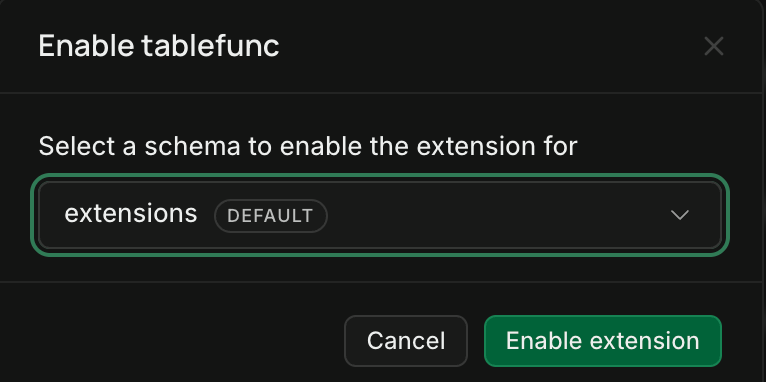
However, you can change it to the public schema or any other exposed schema. Also, if you install it through a SQL statement like CREATE EXTENSION http without specifying with schema extensions, it will be installed into public by default.
We found several projects with http installed this way, which let anyone issue arbitrary HTTP requests from the database and read the full response. One way we could exploit this was that, since the OpenAPI spec restriction is enforced at the API gateway rather than by PostgREST itself, a request originating inside the database reached PostgREST directly on localhost and returned the spec, which we fed back into the rest of the scanning loop.
Edge Functions Exposed Over the API
Edge Functions are TypeScript code snippets that run server-side. A function is called with an HTTP request:
POST /functions/v1/get-payment-methods
apikey: <publishable key>
Authorization: Bearer <access token>
Content-Type: application/json

{"user_id": 4812}
Unlike tables, buckets, and database functions, access to Edge Functions is not controlled with schemas, Postgres grants, or RLS. The Supabase API gateway can only verify that a valid access token is set in the request if Verify JWT is enabled, and after that the function does whatever its code says.
Verify JWT is not an authorization check
When Verify JWT is enabled, the Supabase API gateway checks for a valid JWT in the request's Authorization header. If it's missing or invalid, the gateway blocks the request and returns a 401 response without executing the function code.
On projects still using legacy keys, the anon key is a valid JWT, so a request carrying it in Authorization passes the check and reaches the handler. On projects migrated to the new format, publishable keys are not JWTs and they get rejected.
Either way, this check separates callers with no credential from callers with one the project issued. It does not handle authorization. The custom handler code is where authorization is meant to happen. The current recommended pattern for user-scoped actions is to use the withSupabase wrapper and set the auth mode to user:
auth: 'user'validates the caller's JWT sent on theAuthorizationheader and hands back a database client scoped to their RLS policiesauth: 'secret' / 'publishable'validates a secret/publishable key sent on theapikeyheader and requires Verify JWT to be offauth: 'none'validates neither header, so it runs for any caller.
A function that doesn't use auth: 'user'and builds its client with the project's secret key talks to the database as service_role, outside RLS, and is responsible for enforcing authorization checks.
How Edge Functions were exposed
We tested each function with no credential, with the publishable key, and with a session from an authenticated user account to cover all auth modes available to an attacker.
Functions querying tables as service_role without an authorization check
Most of these functions required an authenticated session to run but performed no authorization checks. The function took an identifier like user_id or organization_id from the request, looked up the corresponding row, did some processing, and returned the result without confirming that the record belonged to the authenticated user, so changing the identifier returned another user's data, an IDOR. These functions built their own database client with a secret key, so the query runs as service_role and even though the table RLS policies were correct, the function could be used to bypass them.
On some projects, we found a separate, lower-severity RLS misconfiguration that leaked all valid user IDs, which we could feed into one of these functions to get every user's data.
Functions that create privileged accounts
We found a function named sign-up-internal on a user-facing app that took an email and password and ran with no credentials. Supplying any email and password created and auto-confirmed an admin account. This account could be used to read tables whose RLS policies had correctly excluded the anonymous and regular authenticated callers we had tested with earlier. This function should have run behind auth: 'secret' (or not existed at all, with admin users created through the Supabase dashboard).
Case studies
We automated detection of the vulnerability patterns described above and added it as a scanning module to our attack surface management product. For the most serious vulnerabilities it found, we analyzed the business impact and worked with the affected teams to help with remediation and incident response.
This section walks through a few of the more interesting cases to show how these vulnerabilities play out in real applications.
“This is not our Supabase”
One of the first Supabase instances our scanner flagged on a client's attack surface was a Lovable web app. The scanner explored it and found the Supabase project ID and publishable key in the JavaScript code, along with 2 storage buckets, 2 edge functions, 4 database functions, and over 40 tables. An initial pass with the publishable key found only 1 readable table.
Then the scanner checked the project's authentication settings. Sign up was enabled, so it created an account. After that, it could read and write to almost all of the tables and buckets, and execute every function.
After reviewing the findings, we found out that the exposed tables and buckets contain sales data, and the vulnerable app was the company's CRM. We could read the name, email, and outreach status of their 9,000+ prospects. Almost 300 deals with stage, close probability, and the private notes from the sales team (and their AI agents), along with close to 2,000 meetings with attendee lists and notes, and the email templates for their outbound campaigns.
{
  "institution": "[redacted organization name]",
  "domain": "[redacted domain name]",
  "stage": "Onboarding - Closed Won",
  "lead": "[redacted person name]",
  "priority": "high",
  "closing_probability": 100,
  "launch_date": "2026-[redacted date]",
  "notes": "Warm intro from [redacted person name]",
  "poc_name": "[redacted person name], [redacted job title]",
  "next_steps": "[redacted person name] to confirm availability for [redacted date/time]",
  "status_overview": "[redacted person name] confirmed Jun 1 he's awaiting procurement/legal next steps on [redacted]"
}
Soon after this showed up in the client's attack surface inventory, we received a bug report from one of their engineers:
This is not our Supabase, not sure why it's showing on our profile as vulnerable.
After reviewing the asset details and discovery path, they found out that the exposed instance was referenced in the JavaScript of a web app served at a crm. subdomain of their domain. Also, one of the findings was a global_config table that named a member of the company's sales leadership as the default_account_owner, another was a profiles table that listed the names and work email addresses of people on the company’s sales team. It was a custom CRM the sales team had built themselves.
This same company ran their main application on Supabase too. We detected the main app's instance as well, and it had practically no exploitable issues, so the team clearly knew how to secure a Supabase backend. This CRM just never made it into a security review or a pentest scope, because nobody outside the sales team knew it existed.
Someone tried to get there first
The scanner detected a Supabase custom domain on the auth. subdomain of one company's attack surface. It then proceeded to enumerate resources and found an avatars bucket.
The bucket accepted uploads from the anon role. The scanner put together that a custom domain and a bucket upload could lead to a stored XSS, because an uploaded file could be served from a trusted origin.
HTML uploads are not exploitable here, because Supabase downgrades them to text/plain, but an SVG uploaded with an explicit image/svg+xml content type keeps its content type and a browser would render it and run the script inside. It used a proof-of-concept SVG and could trigger the XSS.
When we later reviewed the bucket listing finding, we found files that weren't ours.
attacker-canary-10MB.bin
attacker-canary.html
canary-attack.htm
canary-attack.html
canary-attack.js
canary-attack.svg
canary-attack.pdf
canary-attack.xml
canary-attack.json
Someone else had tried to exploit this bucket already. The files mostly looked like XSS attempts that thankfully didn't work. As mentioned, HTML uploads downgrade to text/plain, and an SVG is only served as image/svg+xml if the upload sets that content-type. These files didn't, so it came back as application/octet-stream and didn't run.
The bucket upload on its own was relatively low severity, since the uploaded files had no exploitable downstream consumer. It was only escalated by the custom domain that allowed the files to be served from the company's trusted origin.
AI agent poisoning
This one started the same way: a Supabase project and publishable key in JavaScript, open sign up, and the scanner registered an account. As it enumerated resources, it found a bucket named agent-knowledge-files.
The company sells AI agents. A customer uploads the material their agent speaks from (tone guides, product facts, etc.) and the agent talks to that customer's users in the customer's name. The uploaded files lived in the agent-knowledge-files bucket, sorted into a folder per customer. The account the scanner registered could read and write to any folder in the bucket, not only its own.
Read access exposed more than 12,000 customer assets across more than 120 customers.
# [redacted company] playbook
Internal reference for the agent. Use it to pick the right style and the right proof for the person in the conversation...
As these files are read into the agents' context at conversation time, write access could allow an attacker to poison the agent's responses to its users. RAG document poisoning is a well-documented attack vector for AI applications, and in this case it started with a regular bucket access control misconfiguration.
The table that looked locked down
A messaging platform had a table called message_log. The scanner tried to read it with the anon key and with an authenticated user session, and both failed. The scanner had access to every script on every host on the company's attack surface through its ASM integration, and one JavaScript bundle contained a shared logging module that queried and updated this table:
const { data: row } = await sb.from("message_log")
  .select("*").eq("message_id", messageId).maybeSingle()
// ...
await sb.from("message_log")
  .insert({ message_id, payload: [entry], created_at: new Date().toISOString() })
The scanner used this code to enrich its definition of the table with column names. message_id comes from the .eq() filter, and payload and created_at from the insert payload. All three went into the inventory, and the scanner queried each column by name individually.
When queried individually, every column returned its values across all rows. payload was a JSON array that included events about the delivery of a message. Each event included the message content, along with the sender and receiver phone numbers, across hundreds of thousands of messages.
{
  "conversation_id": "+190[redacted]",
  "body": "Hello, I'm the [redacted]",
  "sender": "+1[redacted]",
  "provider_response": {
    "account": "[redacted]",
    "from": "+192[redacted]",
    "to": "+190[redacted]",
    "status": "QUEUED"
  }
}
The admin-only function that wasn't in the code
The intro to this article notes that the publishable key can no longer retrieve a project's OpenAPI schema. That said, Supabase also has a GraphQL extension, and until recently it shipped with introspection enabled by default. Introspection is a GraphQL feature that allows clients to ask a GraphQL server about its schema.
On one company's Supabase instance, GraphQL introspection returned 37 table names and 23 database function names. One of the functions was called admin_list_accounts. The scanner called it, and it returned the full customer list:
[
  {
    "name": "[redacted] medical center",
    "slug": "[redacted]",
    "created_at": "2026-01-13T11:09:43.605665+00:00",
    "primary_owner": "[redacted]"
  },
  {
    "name": "[redacted] hospital",
    "slug": "[redacted]",
    "created_at": "2026-01-14T04:36:24.204177+00:00",
    "primary_owner": "[redacted]"
  }
  ...
]
The function name admin_list_accounts clearly indicates it wasn't meant to be called from the client, but since it was installed in the public schema with a grant to the anon role, the only thing standing between an unauthenticated attacker and the customer list was knowing the name of the function, which was revealed by GraphQL introspection.
What the Existing Tooling Covers
If you research how to secure a Supabase backend, four automated approaches will turn up: secret scanning, policy linting, cloud security posture management, and attack surface management. We cross-checked each approach against the vulnerability patterns we found.
Secret scanning
The first thing you learn about Supabase security is to keep the secret / service_role key a secret. A tool that makes sure this key is never committed to a repository or shipped to a client-side bundle is a genuinely good control.
That said, every vulnerability pattern in this article was reached with the publishable / anon key, which is public on purpose, so a secret scanner would have nothing to report.
Policy linting
Supabase released Database Advisors that run inside your project and raise alerts for security and performance issues, mainly by linting RLS policies. A clear advantage of this approach over a black-box scanner is that it sees every resource (table, bucket, function, etc.) in the project, including the unguessable ones that the frontend doesn’t use and no exposed schema leaks.
However, what a linter reads is the policy, not the response. There are more ways to write a policy wrong than a linter can enumerate. Besides that, there are several classes of vulnerabilities that have nothing to do with policies, or where there are linting gaps. Storage for example has a single rule that checks whether a public bucket can be listed. Upload permissions are not tested, to public or private buckets, and listing is not checked on private buckets, which was the most common storage vulnerability we encountered.
Cloud Security Posture Management (CSPM)
Cloud Security Posture Management reads a resource’s configuration and flags risky settings. The types of findings you can expect from most CSPM tools on a Supabase project are things like SSL enforcement and public buckets. The following screenshot shows a CSPM tool’s report on a project with 30 vulnerabilities across tables, database functions, edge functions, and storage.
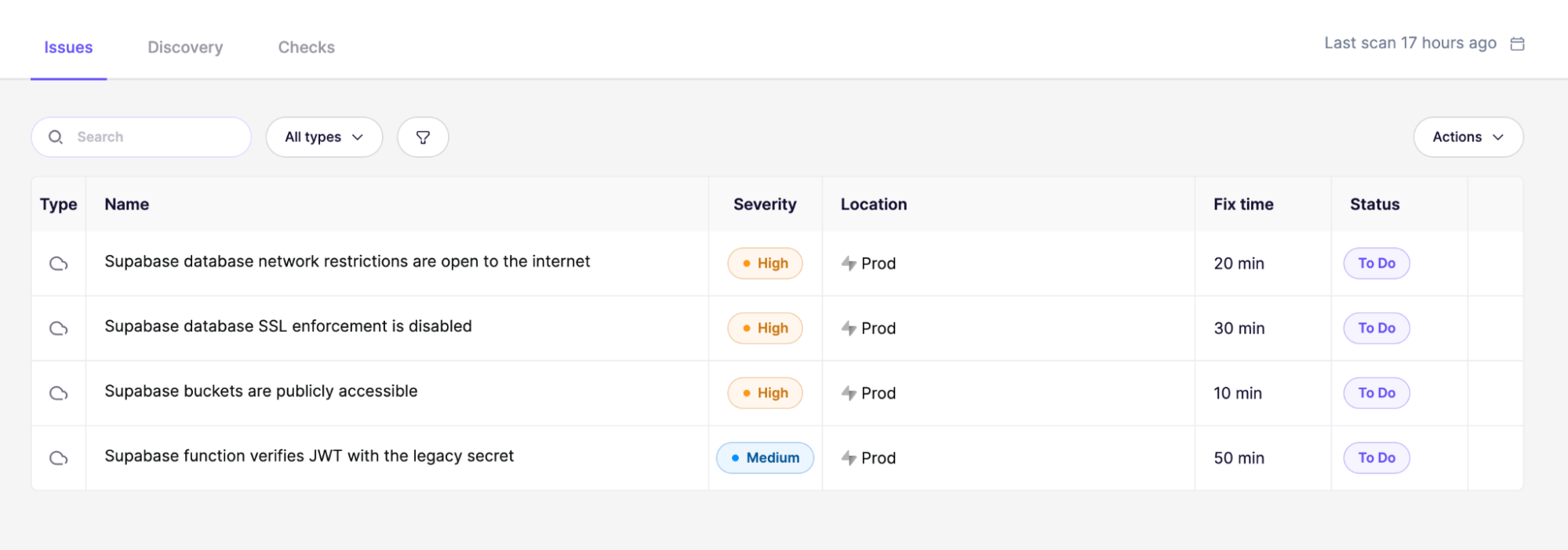
Public storage buckets are the closest thing a CSPM tool finds to what we found, but it only reads the public flag of a bucket, and as covered earlier, that flag is separate from the policies. The majority of our storage findings were on private buckets whose policies were too permissive.
What a connected scanner cannot see
Policy linters and CSPM tools both require privileged access. They have to be connected to your account, and they analyze a policy or cloud misconfiguration in isolation. That leads to two limitations.
First, they obviously cannot see projects they are not connected to. We have found plenty of apps that processed sensitive information that would make the Supabase Database Advisors light up like a Christmas tree, and they probably did, in a Supabase organization the engineering team did not monitor or even knew existed.
The second limitation is that they read each part of a deployment in isolation. They can see that a secret key was generated, but not the public JavaScript file it leaked into. They can see that a bucket accepts uploads, but not that the project has a custom domain and an uploaded SVG will lead to cross-site scripting on that origin.
Attack surface management
Some ASM vendors advertise Supabase scanning. The scanning methodology of most of them can be summarized by the six steps in Aikido Security's documentation. If you have been following along, three of those six steps will already seem like obvious problems.
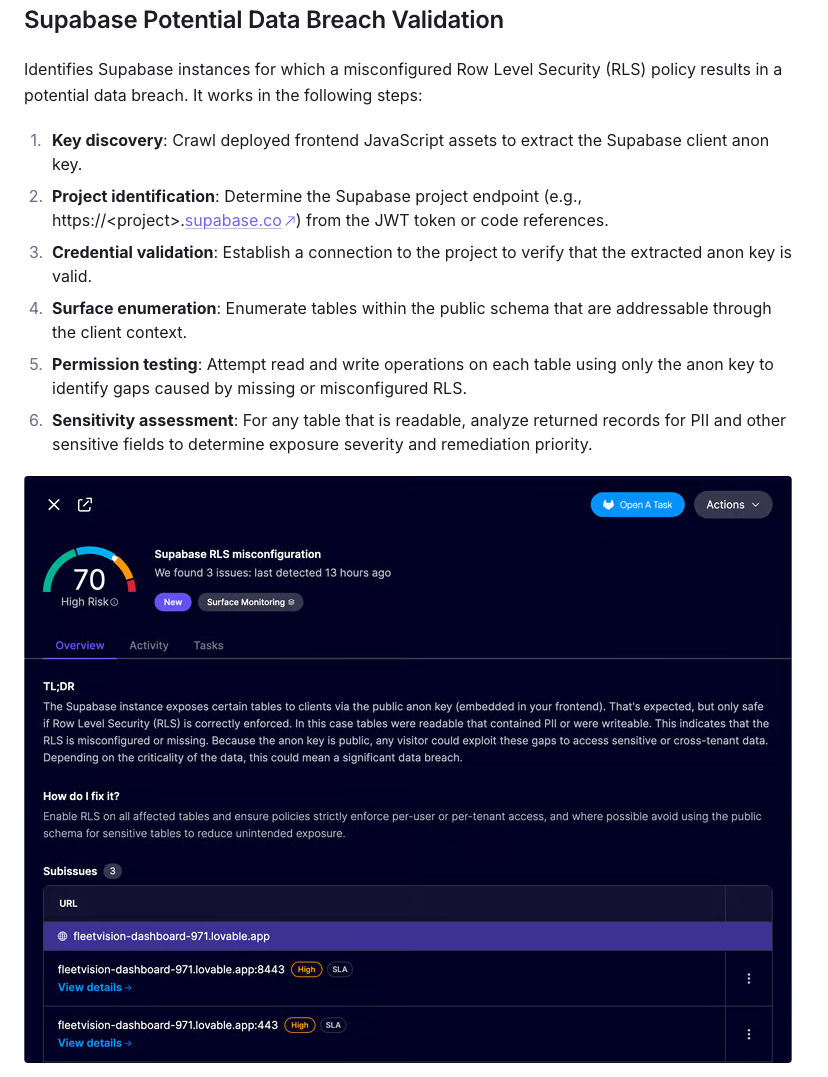
- The
Key discoverystep extracts anon keys only. Supabase is actively replacing anon keys with publishable keys, which have a different format. - The
Surface enumerationstep enumerates the attack surface by requesting the OpenAPI schema. That schema is no longer accessible to the anon/publishable keys.- Also, it only counts tables as part of the attack surface, so buckets, database functions, and edge functions remain a blindspot.
- The
Permission testingstep “attempts read and write operations on each table using only the anon key”, which misses the much larger authenticated attack surface as explained above.
We ran Aikido Security’s Supabase scanner against an application with 30 Supabase vulnerabilities that match the vulnerable patterns we saw.
With the publishable key in the frontend, Aikido never reached the project at all. With the legacy anon key it did, but only when the key was inline on the index page. With the key moved into an imported JavaScript file, it was not found.
And once it had the key, the only request it could make was to the OpenAPI spec at /rest/v1, which returned 401 as it does on every project today. Then it stopped and the scan reported no Supabase vulnerabilities.
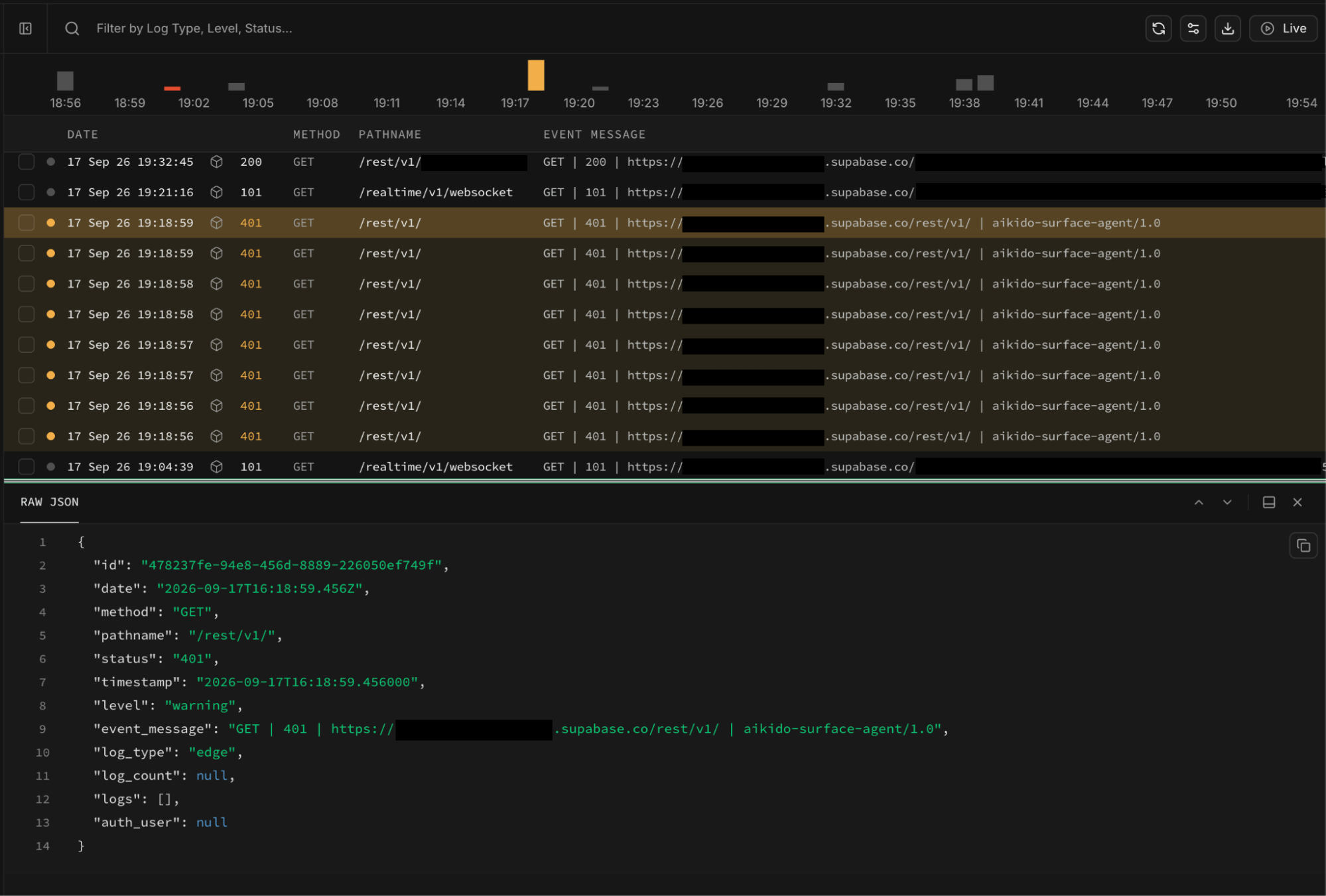
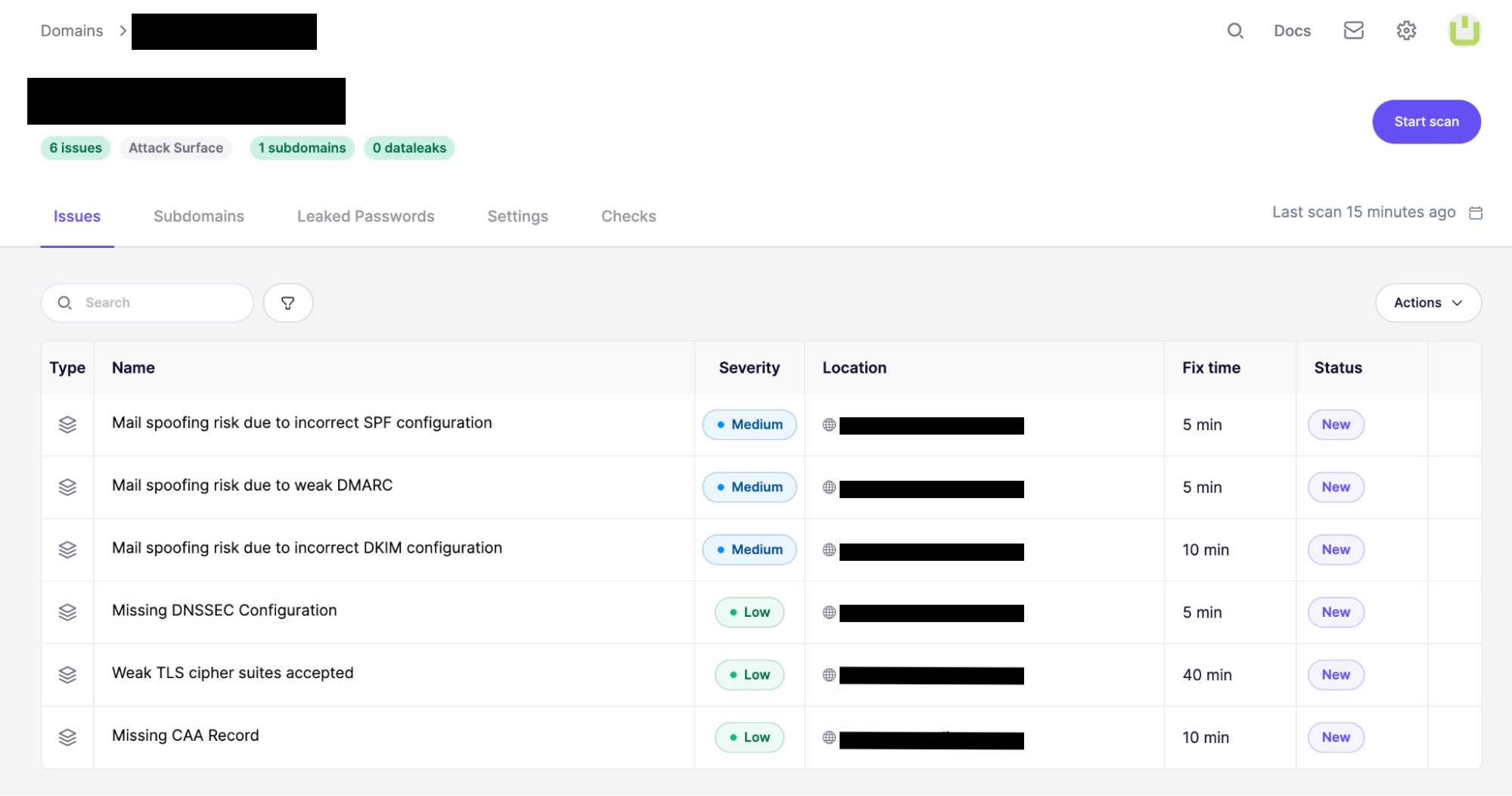
Even a few months ago, when the OpenAPI schema was public, every project used an anon key, and disabled RLS was more common, the pattern this methodology looks for is evidently a small part of the picture as covered at length above.
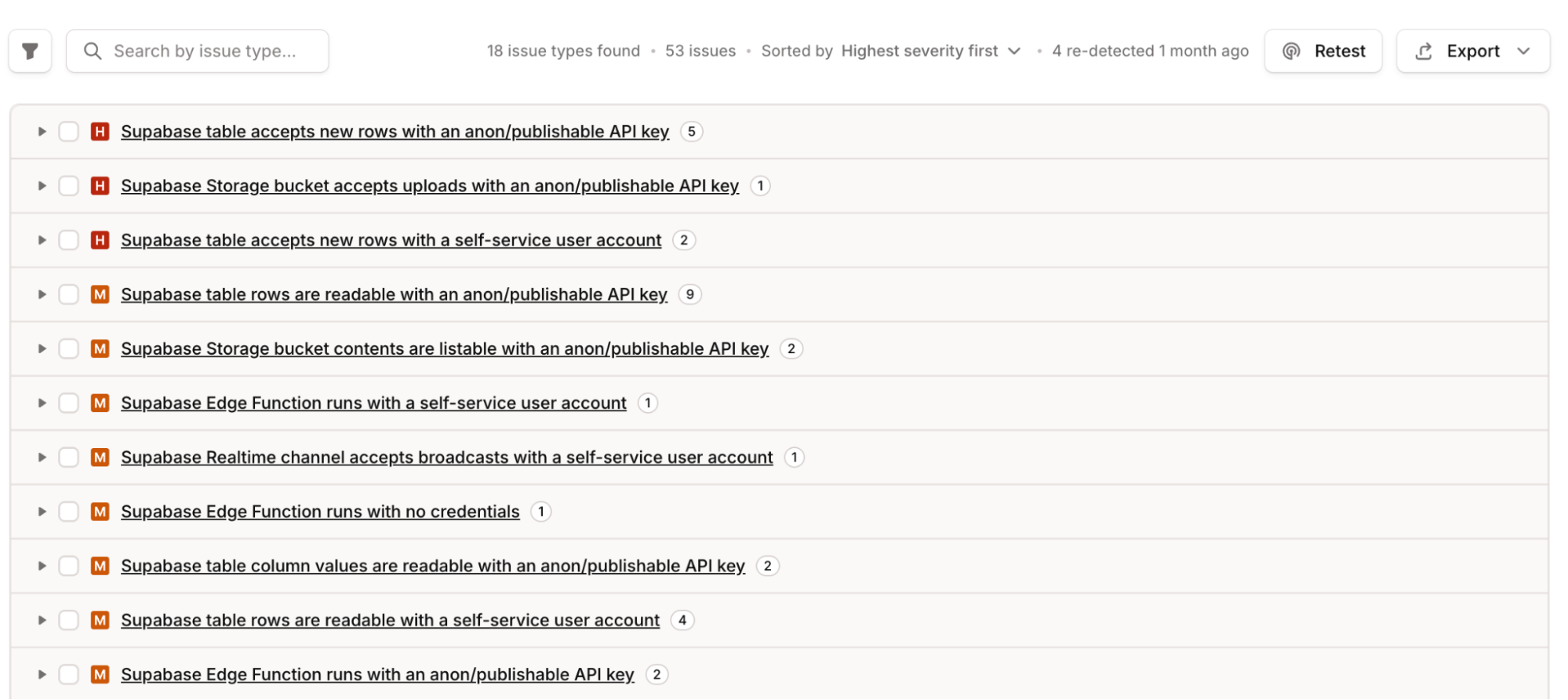
These are the issues that Oneleet ASM finds in the same app with the same configuration.
What We Built
The scanner is a module in our attack surface management product. It works the way an attacker would, with no privileged access, using only what is reachable from the internet.
Discovery
Discovery starts from the live attack surface, not a pre-defined list of projects. Subdomains are constantly discovered and crawled, and whenever a JavaScript snippet or a CNAME DNS record references a Supabase project, that project enters the inventory.
Web applications are crawled with a browser. Scripts loaded at runtime are collected, not only those linked from the index page. Each script is parsed into a syntax tree, and project references, keys (in all formats), tables, buckets, and functions are enumerated based on their usage in JavaScript code.
When GraphQL introspection is enabled or an HTTP extension is installed, they are used to get the schema definition directly from the API, and common resource names are tried from a wordlist built on a dataset of hundreds of open-source Supabase projects.
When the buckets or objects tables of the storage schema are exposed, they are used to enumerate buckets.
Testing
When registration is enabled, an account is created to test every resource as an authenticated caller, in addition to the anonymous caller.
Table reads and writes are tested separately, and when a whole-table read is blocked, each column is requested on its own.
Database function and edge functions are called to find out which are reachable at each authentication level and which return data. Dangerous functions like http_get are flagged.
Storage bucket listing and uploads are tested for all buckets, public and private.
Every finding carries a response that shows a sample of the exposed data along with the HTTP request and response used to trigger the vulnerability, and a curl command to reproduce it.
Software Engineer, Security Tooling